.svg)
.svg)


For years, banks have relied on OTPs as a second factor for logins and sensitive actions. Sent via SMS, these short codes were designed to add security on top of a password. But they have become one of the weakest and most frustrating parts of the banking experience.
They’re relatively weak - vulnerable to interception through phishing or SIM-swap scams - and frustrating to use. Codes can be delayed, fail to arrive, or force users to switch between apps, turning security into a regular source of friction.
For these reasons, major fintech leaders like Revolut and MoneyGram have officially moved to "Passkey-First" security. For the customer, this means the end of passwords and annoying texts. Instead of waiting for a code that might never arrive, users unlock their accounts with Face ID, a fingerprint, or a device PIN.
It's faster, phishing-resistant by design, and in 2026, it is slowly becoming the default experience across the US and Europe.
Biometric continuity
The shift to passkeys - a method based on public-key cryptography where the bank stores a public key and the private key stays on the device - enables biometric continuity. In the past, setting up a new device felt like starting from scratch. Today, multi-device passkey flows ensure that a user’s digital identity follows them seamlessly.
- Ecosystem syncing: Passkeys are securely synced via encrypted clouds (like iCloud Keychain or Google Password Manager). If a customer gets a new phone, their access often syncs automatically.
- Cross-device handshakes: To log into a bank on a new laptop, a user simply scans a QR code with their phone. The devices perform a cryptographic handshake, and the user is in - nothing is typed, nothing is shared.
- Ambient authentication: This removes background anxiety. There is no code to copy and no switching between apps. It feels closer to unlocking a phone than logging into a bank.
The "hidden" tech
The transition relies on the FIDO2 standard, which replaces the shared secret (the password) with a unique cryptographic pair. This shifts the security model from "something you know" to "something you have" (the device) and "something you are" (the biometric).
- Public Key Infrastructure (PKI): When you register, your device creates a key pair. The bank gets the public key - which is useless to a hacker if stolen from the bank’s servers - while your private key never leaves your phone.
- Phishing-resistant by design: Because the passkey is mathematically tied to the bank’s specific domain, a fake phishing website cannot request it. The browser simply won’t offer the passkey to an illegitimate site.
- Zero-knowledge architecture: The bank never sees your biometric data. Instead, it receives a cryptographic confirmation from your device’s secure hardware - proof of identity without access to sensitive facial or fingerprint data.
UX Focus: Designing the "recovery path"
If the device itself is the key, the first thing customers worry about is: "What happens if I lose my phone?" Designing the recovery journey is the real UX challenge of 2026. Banks must make these paths visible and human-readable to maintain trust.
- Trusted device management: UX teams are implementing "Trusted Devices" screens where users can see and revoke access to lost devices instantly.
- Social recovery: Some fintechs allow customers to designate "Trusted Contacts." If locked out, trusted contacts can help approve a recovery request.
- Government ID verification: Using AI-powered matching, a user can scan a Passport or Driver’s License. The app compares a live selfie to the ID to re-issue a passkey without a punishing re-verification loop.
Good UX follows three principles:
- Contextual step-up: Passkeys are powerful for step-up authentication (extra verification for sensitive actions like adding a payee). Overuse triggers biometric fatigue. Good UX triggers a prompt only when behaviour changes or risk increases, not for routine activity.
- Framing as an upgrade: Banks that find success don’t force a change; they offer “Faster, safer sign-in” that happens to be passwordless. Keeping a visible fallback path during the transition prevents a sudden loss of familiar methods from triggering distrust.
- Intentional friction: Because attackers may target recovery flows if they can’t phish a code, recovery should feel appropriately serious. It shouldn’t be instant, but it shouldn’t be punishing either.
The reality behind the lag
Despite the momentum, many traditional banks still operate primarily on OTP-based systems. The reasons are structural, not ideological.
- Legacy infrastructure: Core banking systems built over decades are deeply intertwined with password and SMS-based authentication logic. Replacing that stack is complex and expensive.
- Customer distribution: Not every user has the latest smartphone, updated operating system, or comfort with biometric authentication. Large incumbents serve older, lower-digital, and cross-border populations where SMS remains the lowest common denominator.
- Regulation: OTPs may be flawed, but they are familiar, audited, and deeply embedded in compliance processes. Passkeys require new threat models, new recovery logic, and new fraud monitoring approaches.
Security is a moving target
Passkeys dramatically reduce phishing and credential-stuffing attacks, but they do not eliminate fraud. Instead, pressure shifts toward:
- Account recovery manipulation
- Compromising email or cloud ecosystem accounts
- Social engineering users into approving legitimate biometric prompts
The next phase of security will likely combine passkeys with behavioural intelligence and risk-based authentication. Instead of asking for more factors, banks will rely more heavily on context: location patterns, device reputation, transaction behaviour, and anomaly detection powered by machine learning.
The long-term direction is clear: authentication will become more invisible, more device-bound, and more contextual. Now, let's look at some stellar examples from our 11:FS Pulse library...
Klarna - Biometrics and passkeys
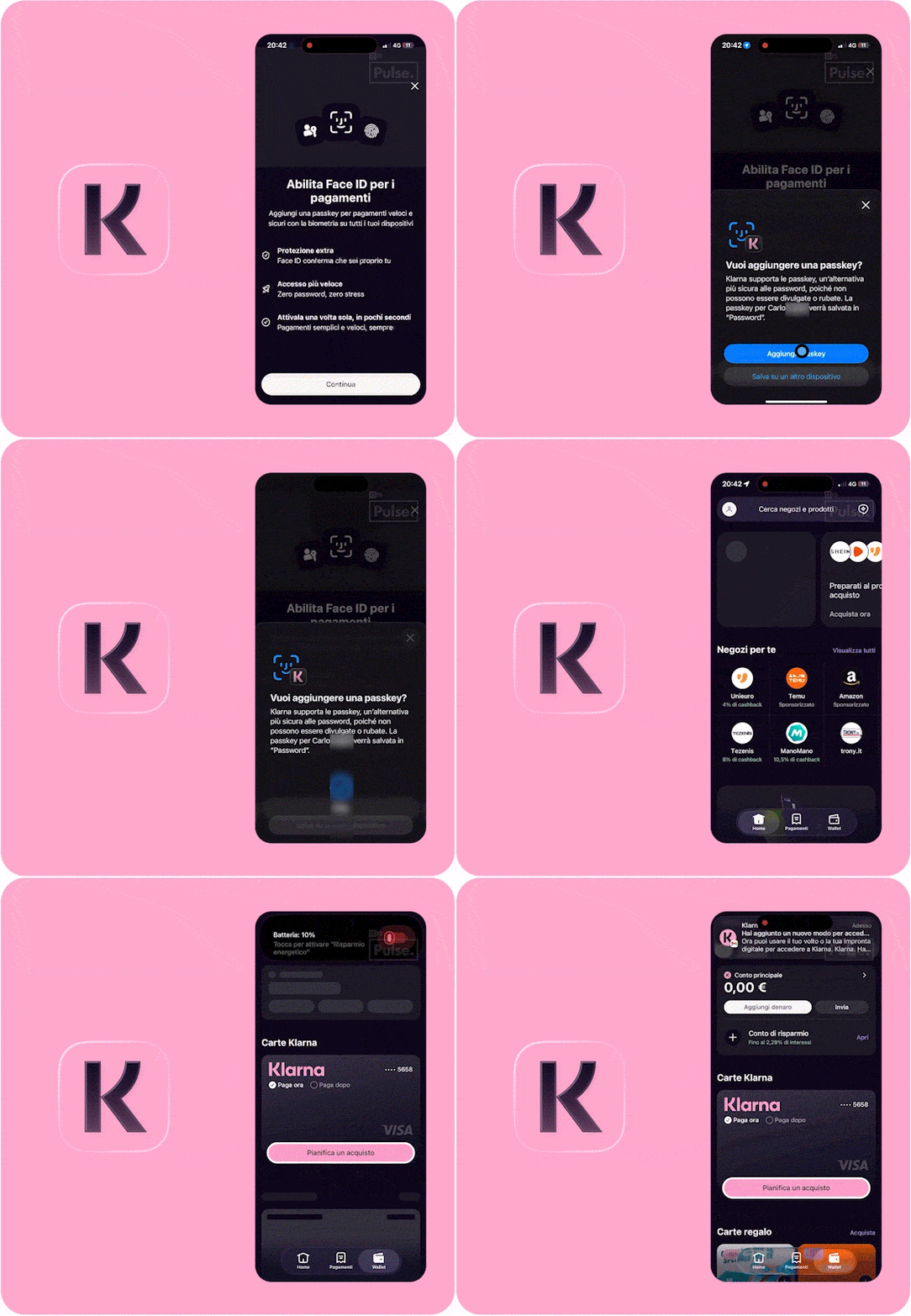
Klarna’s biometrics journey is a strong example of how to make passwordless feel like an upgrade rather than a security lecture.
The flow starts with a clear value proposition framed around speed and protection, not cryptography. Benefits are explained in plain language (“Protezione extra”, “Accesso più veloce”, “Attivala una volta sola”), before handing off to the native iOS passkey sheet, where users are asked if they want to add a passkey and shown exactly where it will be stored.
The biometric confirmation happens in the familiar system modal, reinforcing trust, and the journey ends with an explicit success state and in-app confirmation that a new login method has been added. What stands out is the continuity: from education, to system-level authentication, to reassurance inside the app.
It’s a clean example of passkey-first onboarding done right - contextual, transparent, and anchored in user confidence.
Current - Security settings
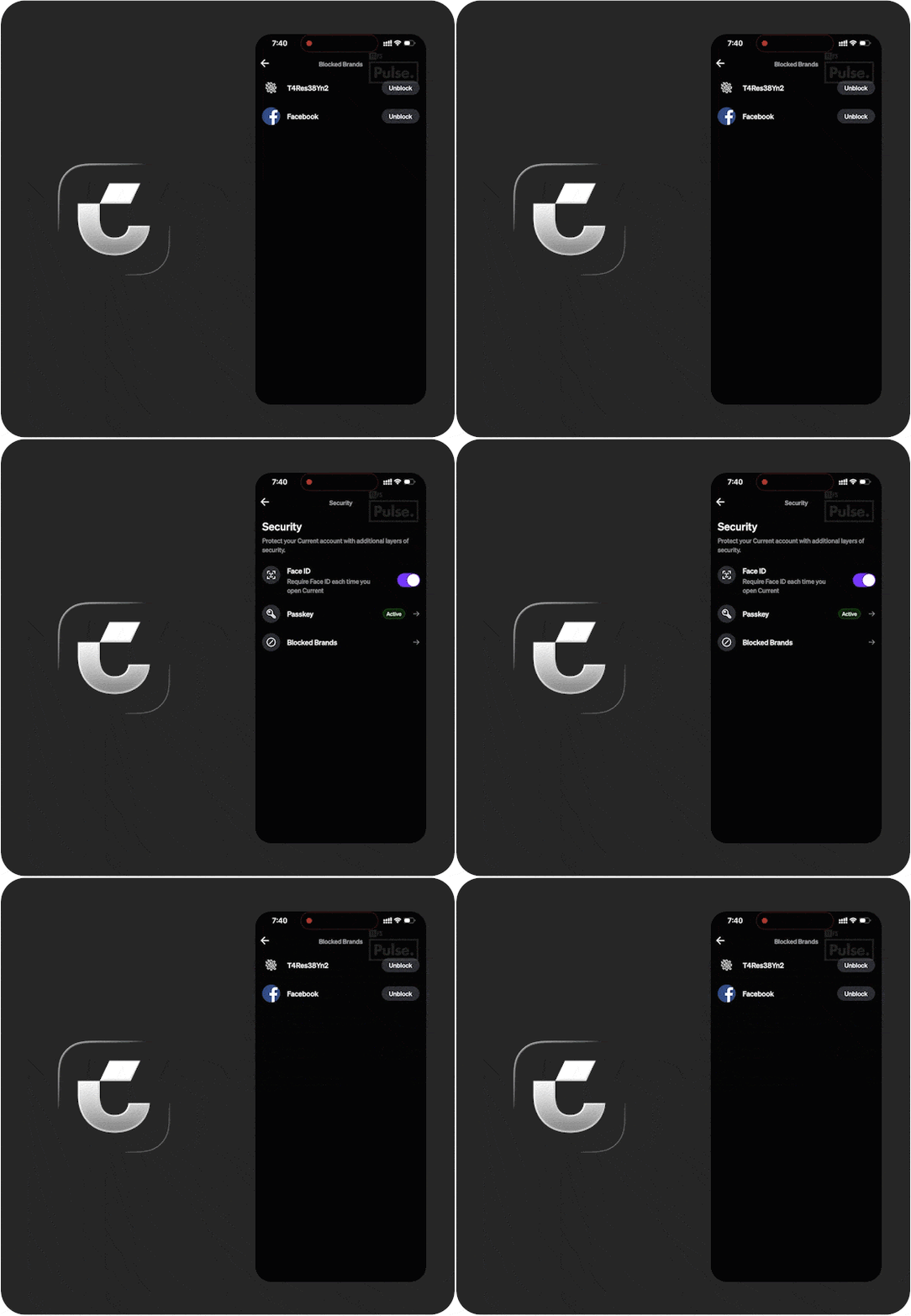
Current embeds passkeys within a broader, transparent security hub rather than positioning them as a one-off upgrade.
In the Security screen, Face ID is framed as an app-level protection toggle (“Require Face ID each time you open Current”), while Passkey sits alongside it with a clear “Active” status badge, signalling permanence and legitimacy.
By placing passkeys inside settings, near controls like “Blocked Brands,” Current reinforces that authentication is part of a wider trust toolkit users can actively manage.
Best-in-class user experiences, at your fingertips
11:FS Pulse gives you access to over 21,000 handpicked user journeys from 850+ brands worldwide — a live, visual library of what’s working in digital banking today. Stay ahead of competitors, spot emerging trends, and cut your product research time by up to 90% - just ask Monzo.
Book your demo with our experts at 11fs.com/pulse and see what you’ve been missing.